
How to Accept RA Take Me Out Vouchers
RA Take Me Out Vouchers are an exclusive member benefit that allows your customers to pay using vouchers they’ve received. The vouchers are distributed as part of the Restaurant Association’s member benefits programme, available as both paper vouchers and eVouchers.
Member Benefits at a Glance
✓ No transaction fees – Keep 100% of the payment
✓ No merchant fees – Exclusive benefit for Restaurant Association members
✓ No setup costs – Free to accept as a member
✓ Simple online redemption – Works with any smartphone, tablet, or computer
These vouchers provide a fee-free payment option that’s easy to process at your venue.
Customers with RA Take Me Out Vouchers search dinefind.co.nz to find venues that accept them. All members are automatically listed as accepting vouchers when they join.
How to process an RA Take Me Out Voucher
Step 1: Access the redemption portal

Make sure you process the voucher at time of payment.
For eVouchers, you can scan the QR code using any smart device such as a tablet or smartphone.
For paper vouchers go to dinefind.co.nz/redemption.
Step 2: Enter voucher and member details
Enter the Voucher code (if QR code was scanned, this will already be entered).
Enter your RA member number. You can find this at the top of your member dashboard here.
Hit ‘Redeem Voucher’.
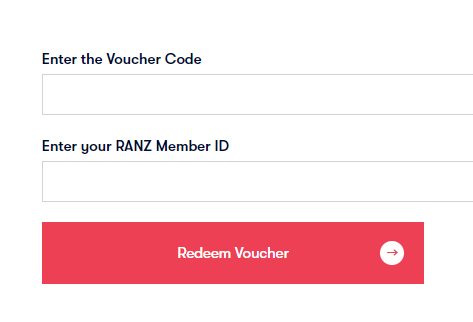
Step 3: Confirm and complete
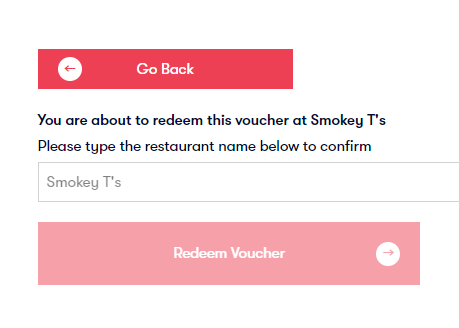
The system will ask you to confirm your business name, to ensure you’ve entered your membership number correctly.
Your business name will be displayed as a guide (note: it is case-sensitive).
That’s it! Easy and fee-free.
Downloadable Resources
Want a printable guide to keep near your till?
Need Help?
If you experience any issues redeeming a voucher, please contact the Restaurant Association on 0800 737 827.
Important details:
Payment processing
If you have already supplied us with your bank account, we will use this for processing your payments for redeemed vouchers. If this changes please notify us at info@restaurantnz.co.nz, or payments will continue into the account we have on record. The Restaurant Association makes reimbursements weekly, on Fridays.
Do not accept expired vouchers
Please do not accept expired vouchers. If requested by the customer you may advise them to contact us. Please do not accept expired vouchers. If requested by the customer, you may advise them to contact us. We cannot pay you for expired gift vouchers. If you send physical vouchers to the Association for redemption we must receive them within one month of expiry of the voucher.
Updating your listing
You can update your listing details in your member dashboard here. Once edited the information updates on the Dinefind website overnight.
Acceptance is a member benefit
Acceptance of the RA gift vouchers by members is a key benefit and part of the Association’s terms and conditions. The Association automatically lists you as accepting vouchers on dinefind.co.nz when you join.
If you wish not to accept them please contact us to discuss.
Frequently Asked Questions
Where do customers get these vouchers?
RA Take Me Out Vouchers are sold at www.dinefind.co.nz. They’re available as both paper vouchers and digital eVouchers.
How do I find my RA member number?
Your member number is displayed at the top of your member dashboard when you log in at www.restaurantnz.co.nz.
What if I enter the wrong member number?
The system will display your business name for confirmation. If it doesn’t match your venue, simply go back and re-enter your member number.
When will I receive payment for redeemed vouchers?
All reimbursements for vouchers redeemed are made weekly on Fridays via direct deposit to your bank account on file.
Can I accept a voucher that’s about to expire?
Yes, as long as the voucher hasn’t passed its expiry date. Physical vouchers sent to the Association for redemption must be received within one month of expiry.
What if a customer has an expired voucher?
Do not accept expired vouchers. Advise the customer to contact the Restaurant Association directly to discuss their options.
How do customers find venues that accept these vouchers?
Customers search on dinefind.co.nz. All Restaurant Association members are automatically listed as accepting vouchers when they join.
How do I redeem the Restaurant Gift Cards?
Get step-by-step instructions for redeeming the Association’s Restaurant Gift Cards here: www.restaurantnz.co.nz/restaurant-gift-card-redemption/

“To the entire team at Restaurant Association. Just wanted to say a massive THANK YOU!!! I have really appreciated the events that you have held, the vouchers that I have been able to redeem and greatest of all being able to call you when I have legal questions. You do an amazing job in my opinion and I couldn’t recommend your services more highly than I do.”